Introduction
Secure Document Viewing App Based on Viewer
1. Overview
- DS for Mobile isDocument Viewer Functionalitycan securely view documents without in-app decryption or storage, and on both Android/iOS platforms.Capture Prevention FeatureProvides security features such as this to users.
DS for Mobile Configuration
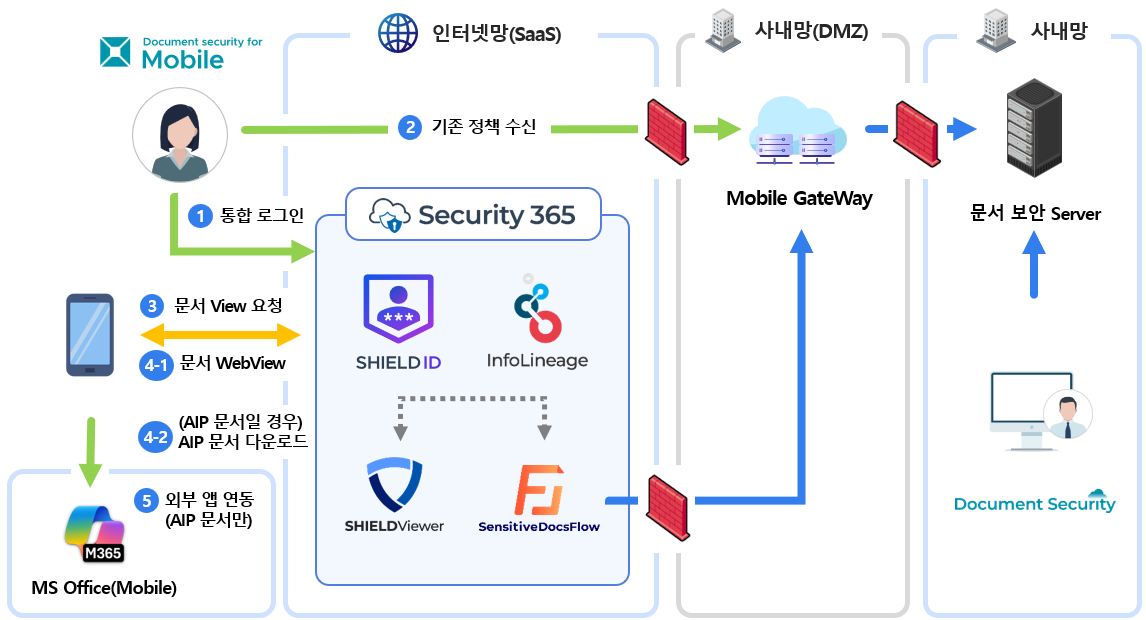
The DS for Mobile configuration environment has the following processes.\
1. User Authentication → 2. Receiving Conditional Policy → 3. Document Viewing Request → 4. Viewing Document through Viewer
2. Key Features
WebView-based lightweight viewer app
Instead of processing the document directly within the mobile app, it is loaded in WebView using a secure viewing URL generated by the Viewer Server,
You can quickly and securely check documents without the complicated app processing.
High Security with Server-Centric Decryption
The encryption, decryption, and security processing of documents are all performed on the server, and this structure fundamentally blocks the risk of document leakage that can occur in mobile environments, allowing for the safe protection of important corporate information.
Enhanced User Authentication
Security365 User Authentication / Document Security Server Loginbiometric authentication, OTP, etc.MFA AuthenticationEnhances the security of user identification through __PH_0__.
3. Improvements to Existing Company Products
| item | Existing company products | DS for Mobile |
|---|---|---|
| Document Processing | Editing features included (SDK) | Read-Only (WebView) |
| Decryption Method | Decryption within the app | Decryption on a dedicated Viewer server |
| SDK Dependency | Third-party Office SDK required | None |
| Security Architecture | Client-Centered- Risk of exposure of decrypted plaintext file - Risk of exposure of document encryption key for decryption | Server-Centric- Non-exposure of decrypted plaintext file - Non-exposure of document encryption key for decryption |
| Capture prevention | iOS - Capture Completely Blocked (Capture is blocked for all apps) | iOS - Detection and Response (Allow Capture, Screen Blinding Processing) |
| MFA Authentication | Unsupported | support |
4. Introduction Effect
-
Provide viewing only without editing on mobile devices, and minimize the risk of information leakage through security features such as capture blocking.
-
Immediately usable without complex app settings or additional program installations.
-
You can utilize the existing security infrastructure (Security365, document security server) as is.